

2D Light
Apply different shaped light on the image.
Node Data | |||||||||||||||||||||||||||||||||||||||||||||||||||||
|---|---|---|---|---|---|---|---|---|---|---|---|---|---|---|---|---|---|---|---|---|---|---|---|---|---|---|---|---|---|---|---|---|---|---|---|---|---|---|---|---|---|---|---|---|---|---|---|---|---|---|---|---|---|
 | |||||||||||||||||||||||||||||||||||||||||||||||||||||
Display name | |||||||||||||||||||||||||||||||||||||||||||||||||||||
2D Light | |||||||||||||||||||||||||||||||||||||||||||||||||||||
Internal name | |||||||||||||||||||||||||||||||||||||||||||||||||||||
Node_2D_light | |||||||||||||||||||||||||||||||||||||||||||||||||||||
Inheritances | |||||||||||||||||||||||||||||||||||||||||||||||||||||
| Node_Processor | |||||||||||||||||||||||||||||||||||||||||||||||||||||
| Node_2D_light | |||||||||||||||||||||||||||||||||||||||||||||||||||||
Inputs | |||||||||||||||||||||||||||||||||||||||||||||||||||||
Node_2D_light | |||||||||||||||||||||||||||||||||||||||||||||||||||||
surface |
Surface In |
||||||||||||||||||||||||||||||||||||||||||||||||||||
| |||||||||||||||||||||||||||||||||||||||||||||||||||||
Outputs | |||||||||||||||||||||||||||||||||||||||||||||||||||||
Node_2D_light | |||||||||||||||||||||||||||||||||||||||||||||||||||||
surface |
Surface Out |
||||||||||||||||||||||||||||||||||||||||||||||||||||
surface |
Light Only |
||||||||||||||||||||||||||||||||||||||||||||||||||||
Attributes | |||||||||||||||||||||||||||||||||||||||||||||||||||||
| Color Depth | |||||||||||||||||||||||||||||||||||||||||||||||||||||
2D Light node draw a light on top of original surface. If you want the light to cast a shadow, check out Cast Shadow.
Light Properties
Light Shape
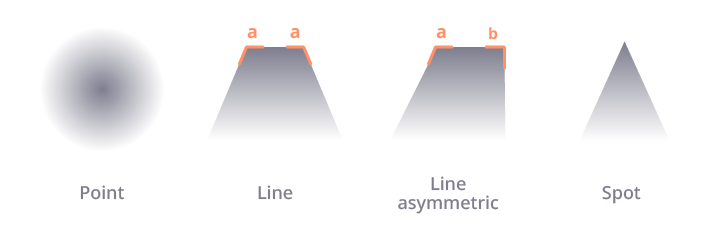
Control the shape of the light. There are 4 available shapes: Point, line, line asymmetric, and spot.
Range
The size of the light.
Intensity
The brightness of the light. Adjusting this amount may effect the resulting range.
Color
Control color of the light. Note that light use additive blending.
Attenuation
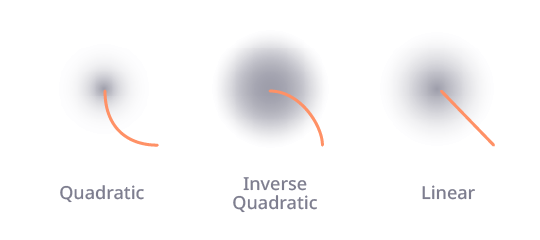
Control the falloff of the light. There are 3 available falloff: quadratic, invert quadratic and linear.
Banding
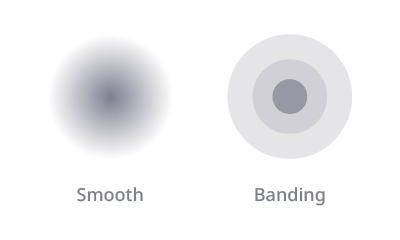
Banding convert smooth light to discrete steps. The banding width depends on the Attenuation.
Radial Properties
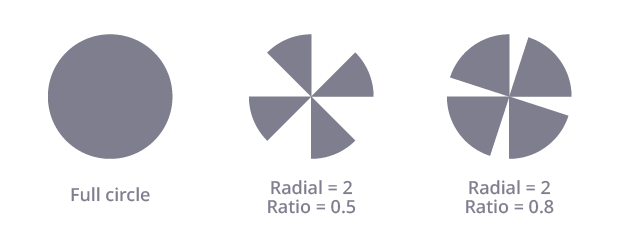
With point light, you can use Radial Banding to add the "shine" effect to the light.
Radial Banding
The amount of radials, set to 0 for a full circle.
Radial Start
Rotate the radial effect.
Radial Band Ratio
The width of the radial band as a ratio. 0 means no light and 1 mean fulll circle.
Related Links
- Base Code: /scripts/node_2d_light/node_2d_light.gml
- Shader [sh_2d_light_apply]: /shaders/sh_2d_light_apply/sh_2d_light_apply.fsh
- Shader [sh_2d_light]: /shaders/sh_2d_light/sh_2d_light.fsh
- Shader [sh_FXAA]: /shaders/sh_fxaa/sh_fxaa.fsh