

Sprite Stack
Create sprite stack either from repeating a single image or stacking different images using array.
Node Data | |
|---|---|
 | |
Display name | |
Sprite Stack | |
Internal name | |
Node_Sprite_Stack | |
Inheritances | |
| Node_Processor | |
| Node_Sprite_Stack | |
Inputs | |
Node_Sprite_Stack | |
surface |
Base Shape |
enum |
Output Dimension Type |
dimension |
Dimension |
vec2 |
Relative Dimension |
enum |
Array Process |
int |
Stack Amount |
vec2 |
Stack Shift |
bool |
Move Base |
vec2 |
Position |
rotation |
Rotation |
color |
Stack Blend |
slider |
Alpha End |
enum |
Highlight |
color |
Highlight Color |
slider |
Highlight Alpha |
Outputs | |
Node_Sprite_Stack | |
surface |
Surface Out |
Attributes | |
| Color Depth | |
Sprite stack is a way to create a 3D like image using 2D images by stacking them on top of each other.

Stacking Positions
When stacking, each copy will be shifted by the amount set by the Stack Shift properties. The final position can also be adjusted by the Position.
The Move Base property will revert the position such that the original image got shifted instead of the copies.

Rendering Properties
Stack Blend will blend the copies with a new color. You can make make the copies fade out over time with the Alpha End property.

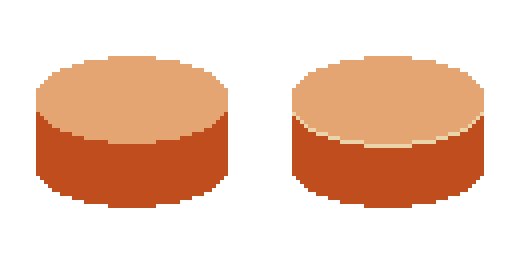
The Highlight property allow you to change the color of the edge.
Related Links
- Base Code: /scripts/node_sprite_stack/node_sprite_stack.gml
- Shader [sh_sprite_stack_highlight]: /shaders/sh_sprite_stack_highlight/sh_sprite_stack_highlight.fsh